Your AI computer, always ticking.

ChatGPT, Claude and more, never switched off. Tickring brings every one of them into a single app.

Works with
  • ChatGPT
  • Claude
  • Antigravity
  • Grok
  • Kimi
  • Qwen
  • DeepSeek

Every AI in one place. Never off, and always yours.

One app for every AI

Ask any of them. Type @ to bring in another for a second opinion, or hand a chat over with its context.

Always on

Your private Tickring Computer carries on while your own computer sleeps, so answers and files are waiting when you return.

Privacy built in

Your own Tickring Computer, encrypted connections and sign-ins that stay yours. Built in, not a setting you have to find.

Inside Tickring:

Connect your own AI accounts and APIs on your Tickring Computer. You sign in to AI accounts yourself. Tickring never asks for those passwords.

Every AI

ChatGPT, Claude and more, all in one app.

ChatGPT, Claude, Antigravity, Grok, Kimi, Qwen and DeepSeek, with your own supported AI accounts and APIs, running on your Tickring Computer in a window designed to stay out of your way.

  • ChatGPT
  • Claude
  • Antigravity
  • Grok
  • Kimi
  • Qwen
  • DeepSeek
  • The genuine apps.

    ChatGPT, Claude and the other AIs run on a Tickring Computer of your own, so your plans, models and history come with you.

  • One app for every AI.

    Ask whichever you like. Type @ to pull in another for a second opinion, or pass a chat on with its context.

  • Never off.

    Your Tickring Computer carries on while your own computer sleeps, so answers and files are ready when you return.

Chat

All your chats, side by side.

ChatGPT and Claude chats sit together in one sidebar, next to your Spaces and projects. Pick up any of them where you left off.

The Tickring app on a Mac showing a ChatGPT conversation that plans three days in Lisbon, with Spaces, projects and recent ChatGPT and Claude chats in the sidebar
ChatGPT and Claude chats side by side in one sidebar

Usage

Know how much of each plan remains.

You keep your own ChatGPT and Claude plans. Tickring shows how much of each plan's limit is left and when it resets, so you know what's left before a long task.

Settings, Usage: how much of the ChatGPT and Claude plan limits is left and when they reset
How much of each plan is left, at a glance

AI access by plan

Go
ChatGPT + Claude
Plus
All 7 current AIs
Pro
All 7 AIs + future additions
Ultra
All 7 AIs + future additions

Connect your own AI accounts and APIs on your Tickring Computer. You sign in yourself, and Tickring never asks for your AI account passwords. Every chat keeps running there, and the AIs ask before they change anything that matters.

Pro and Ultra

Multiple Accounts and APIs

Connect multiple accounts and APIs for supported AIs. Where account switching is supported, Tickring automatically moves to another available account as usage limits approach, carrying your conversation over. Automatic account switching is not available for ChatGPT, Claude, and Antigravity. Automatic API switching is supported for ChatGPT, Gemini, and Claude. Kimi account switching is shown for illustration. Compatibility has not been verified.

  • Multiple Accounts and APIs

    Link more than one account or API connection for each supported AI.

  • Automatic switching.

    As usage limits get close, Tickring moves to another available account. Automatic account switching is not available for ChatGPT, Claude, and Antigravity. Automatic API switching is supported for ChatGPT, Gemini, and Claude.

  • Chat handover.

    When Tickring switches for you, the conversation and its context move with it to the next account.

  • Every future AI.

    On top of today's 7, Pro and Ultra pick up new AIs as they are added.

Multiple Accounts and APIs, with automatic account switching and chat handover. Automatic account switching is not available for ChatGPT, Claude, and Antigravity. Automatic API switching is supported for ChatGPT, Gemini, and Claude.

Go
Not included
Plus
Not included
Pro
Included
Ultra
Included

Code

Build with Claude. See it come to life.

Give each project a Space. Claude works in its folder, and the app you are building runs on your Tickring Computer in a live preview next to the chat. Connect GitHub, keep your repositories up to date, and publish when you are happy.

Project Spaces in Tickring, with pebble-app and pebble-site connected to their folders
Every project in its own Space, shared by ChatGPT and Claude
  • Checks before acting.

    Claude checks with you before editing files or running commands, and commands run in a sandbox for each Space.

  • Live previews.

    Whatever you are building runs on your Tickring Computer and appears in a preview pane beside the chat.

  • Start from a template.

    Landing pages, portfolios, dashboards, blogs and more, ready for ChatGPT or Claude to take further.

  • GitHub, connected.

    Link GitHub and keep your repositories current.

  • Ship when you're ready.

    Publish as soon as you're happy with the result.

  • Keeps on building.

    Work carries on on your Tickring Computer after you close your laptop.

Start from a template, ready for ChatGPT or Claude to build on:

  • Landing pages
  • Portfolios
  • Dashboards
  • Blogs
  • and more

Voice

Simply talk to it.

Start a voice conversation with ChatGPT or Claude in one tap. Voice runs through your Tickring Computer, so there is nothing extra to install. Talk through ideas, hand a task to your chat, or listen to an answer.

A voice conversation in Tickring: the animated orb above the composer and the spoken requests shown as purple messages
A voice conversation, with what you said in the chat
  • Hands free. Talk naturally. What you ask shows up in the chat as you go, so nothing gets lost.
  • Hand off to the chat. Ask for something bigger and the voice passes it to the open ChatGPT or Claude chat to work on.
  • Read aloud. Have any answer read aloud.

Voice by plan · usage resets every billing period

Go
Not included
Plus
Limited usage
Pro
5× Plus
Ultra
20× Plus

Spaces & Drive

All your work, together on your Tickring Computer.

Give each project a Space with its chats, files and memory. Drive keeps everything both assistants make.

  • One Space per project.

    A project's chats, files and memory in one place, shared between ChatGPT and Claude.

  • A Drive for everything.

    Every file either assistant creates or you upload, together and ready to preview.

  • Synced with your computer.

    Choose folders on your computer and keep them in step with your Tickring Computer.

Spaces

A Space for every project.

Memory and files for the work ChatGPT and Claude share: one folder for files, one memory both of them read and add to, and the chats that belong together.

The Spaces page with project Spaces, their chats from ChatGPT and Claude, and when each was updated
A Space per project, shared by ChatGPT and Claude

Drive

Every file, on your own Tickring Computer.

Recent files from ChatGPT and Claude chats, folders and uploads, all stored on your Tickring Computer and ready to preview.

Tickring Drive with recent files from ChatGPT and Claude chats, folders and files stored on the server
Drive keeps everything both assistants make

Your Tickring Computer

A private computer that never switches off.

Every plan includes your own Tickring Computer, dedicated to your account and always on. Tickring Computers are hosted in Tier 3 data centers in the US or EU. Tickring handles setup and maintenance.

  • 6–16CPU cores
  • 12–64 GBRAM
  • 200–1000 GBSSD storage
  • 300 Mbps–1 GbpsNetwork speed
  • UnlimitedTraffic, subject to fair use

From Go to Ultra. Each plan's exact specs are on its card under Pricing.

  • Never off.

    Your Tickring Computer keeps going while your own computer is shut or asleep.

  • Yours alone.

    Every customer gets a separate Tickring Computer, keeping your chats, files and sign-ins apart.

  • Updates, handled.

    Your Tickring Computer and the Tickring apps update themselves with signed releases.

  • Every device.

    Use the Tickring app on Mac or Windows. Coming soon on the App Store for iPhone, Google Play for Android, and the Mac App Store for Mac. Remote access through the ChatGPT and Claude apps is separate.

Every plan

Full snapshots

Full snapshots of your Tickring Computer, kept as restore points: 2 on Go; 3 on Plus, Pro and Ultra.

2–3full snapshots

Pro and Ultra

Automated daily backups

Pro and Ultra also back up your Tickring Computer automatically every day, and keep each backup for 7 days.

7days of daily backups

Snapshots and backups by plan

Go
2 snapshots
Plus
3 snapshots
Pro
3 snapshots + daily backups
Ultra
3 snapshots + daily backups

Tickring credits

Cloud machines, only when a task calls for one.

Tickring does everything it can on your Tickring Computer first. When a task needs a Windows or Mac computer, or a GPU, Tickring uses one. On Ultra, Windows tasks use Tickring Windows, included with your plan. Your own Mac or PC is used only with your permission. On Pro and Ultra you can also add prepaid Tickring credits to use on-demand cloud computers when you want, after you approve a quote or within limits per task and per day that you set.

  • Cloud Windows PC

    For tasks that need Windows.

    With credits · Pro and Ultra
  • Cloud Linux machine

    A separate Linux machine, apart from your Tickring Computer.

    With credits · Pro and Ultra
  • Cloud Mac

    Apple silicon, for Mac work. A 24-hour minimum of 300 credits ($30).

    With credits · Pro and Ultra
  • Cloud GPU

    For tasks that need a GPU.

    With credits · Pro and Ultra

Credit packs

  • 1 credit = $0.10. Buy packs any time from your dashboard on Pro and Ultra.
  • Purchased credits never expire.
  • Unused reserved credits come back when a task ends.
  • Your Tickring Computer and your own Mac or PC never use credits.
  • 500credits$50
  • 1,000credits$100
  • 2,500credits$250
  • 5,000credits$500
Included with Ultra

Tickring Windows, your private Windows computer.

Always on and included with Ultra. When a task needs Windows, Tickring uses it under your plan's terms, and it never uses credits.

Windows Server 2025 Datacenter · 4 vCPU · 8 GB RAM · 100 GB SSD
On Go and Plus, Windows, Mac and GPU work uses your own connected Mac or PC, only with your permission. Pro and Ultra can also add prepaid Tickring credits to use on-demand cloud computers when you want. See what each plan includes

Security & privacy

Privacy built in.

Your own Tickring Computer, encrypted connections and sign-ins that stay yours. This is how Tickring is built, not a setting you have to find.

  • A private computer of your own.

    Each customer has a separate Tickring Computer, where your chats, files and sign-ins stay apart from everyone else's.

  • Encrypted connections.

    The app, your dashboard and your Tickring Computer only talk over encrypted connections, and only devices you pair can connect.

  • No open doors.

    Your Tickring Computer accepts no incoming connections from the internet. It reaches out through an encrypted tunnel and its address stays private.

  • You control your AI connections.

    Use your own AI accounts and APIs on your Tickring Computer. When a provider requires sign-in, you sign in yourself. We never ask for those passwords.

  • Nothing runs without your say.

    Claude checks before changing files or running commands, and you decide once or for the whole chat. Commands run in a sandbox for each Space.

  • Updates, handled.

    Your Tickring Computer and the Tickring apps update themselves with signed releases, so you are always on a checked version.

More security and privacy details will be shared before Tickring launches.

Tickring Mobile App

Take your Tickring Computer with you.

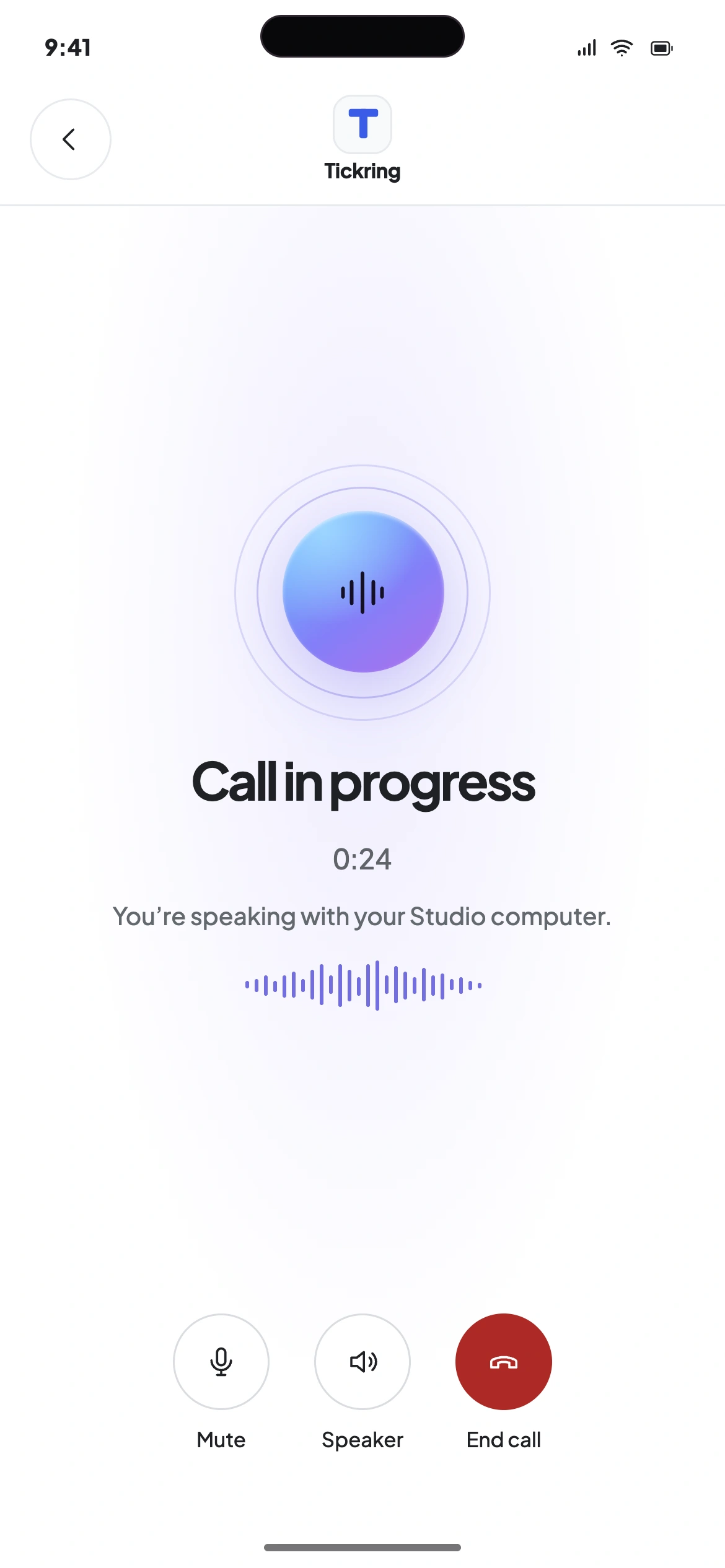
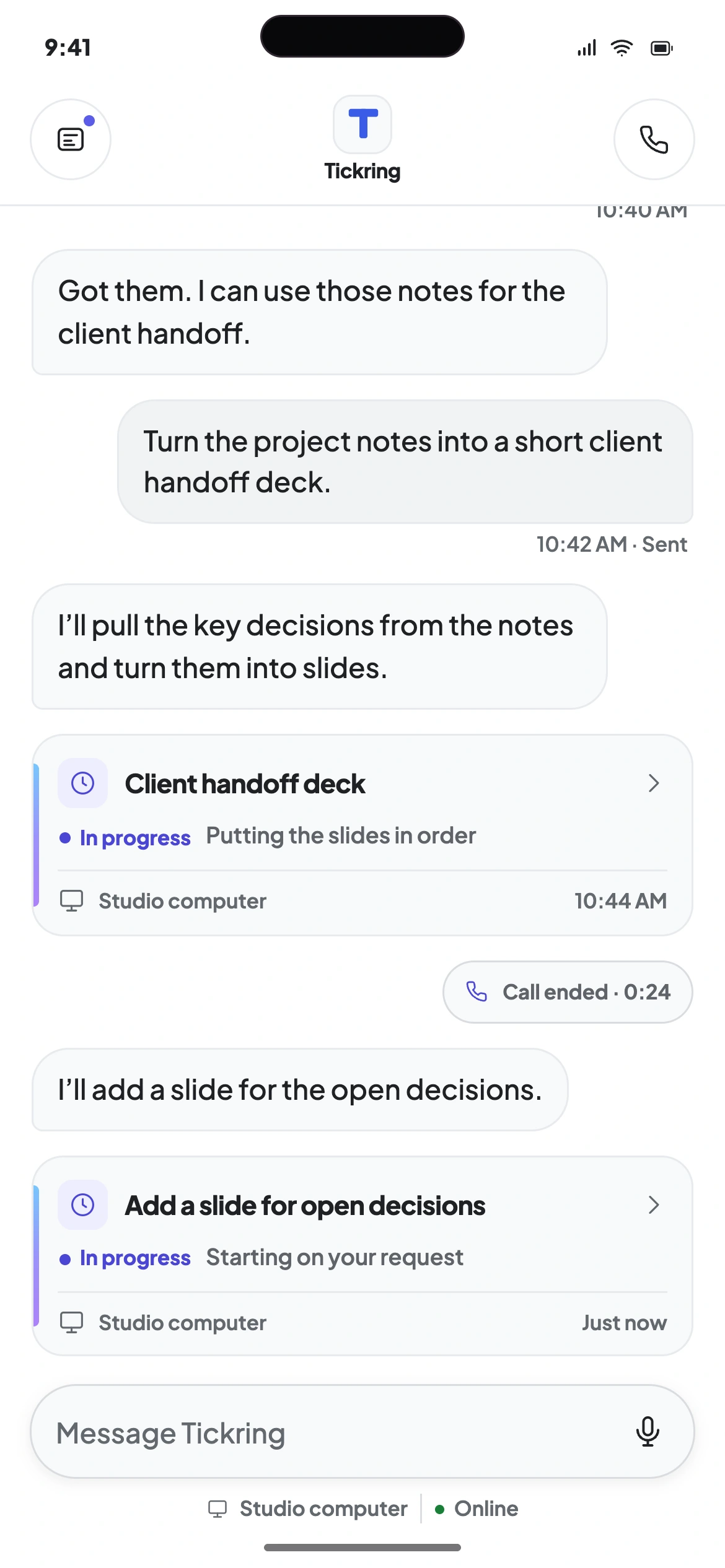
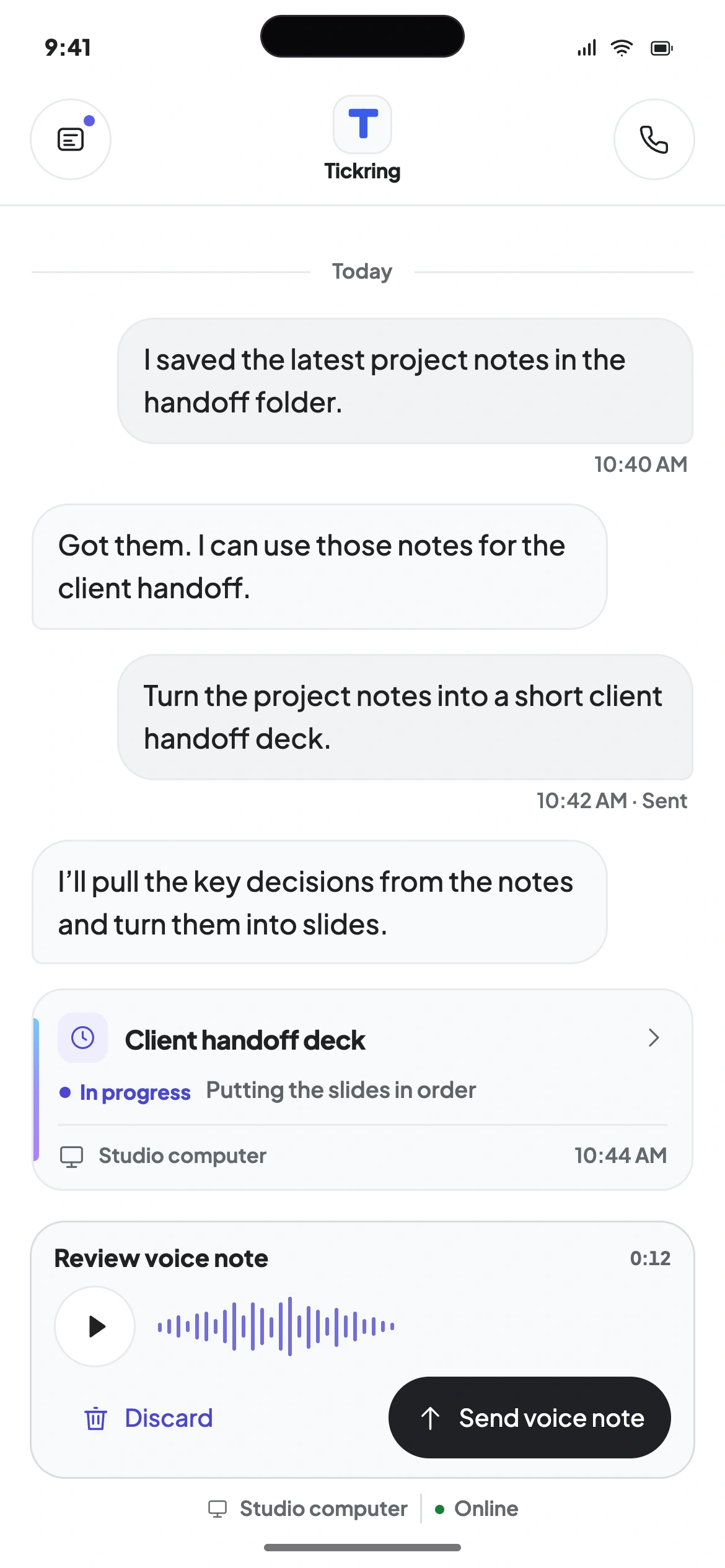
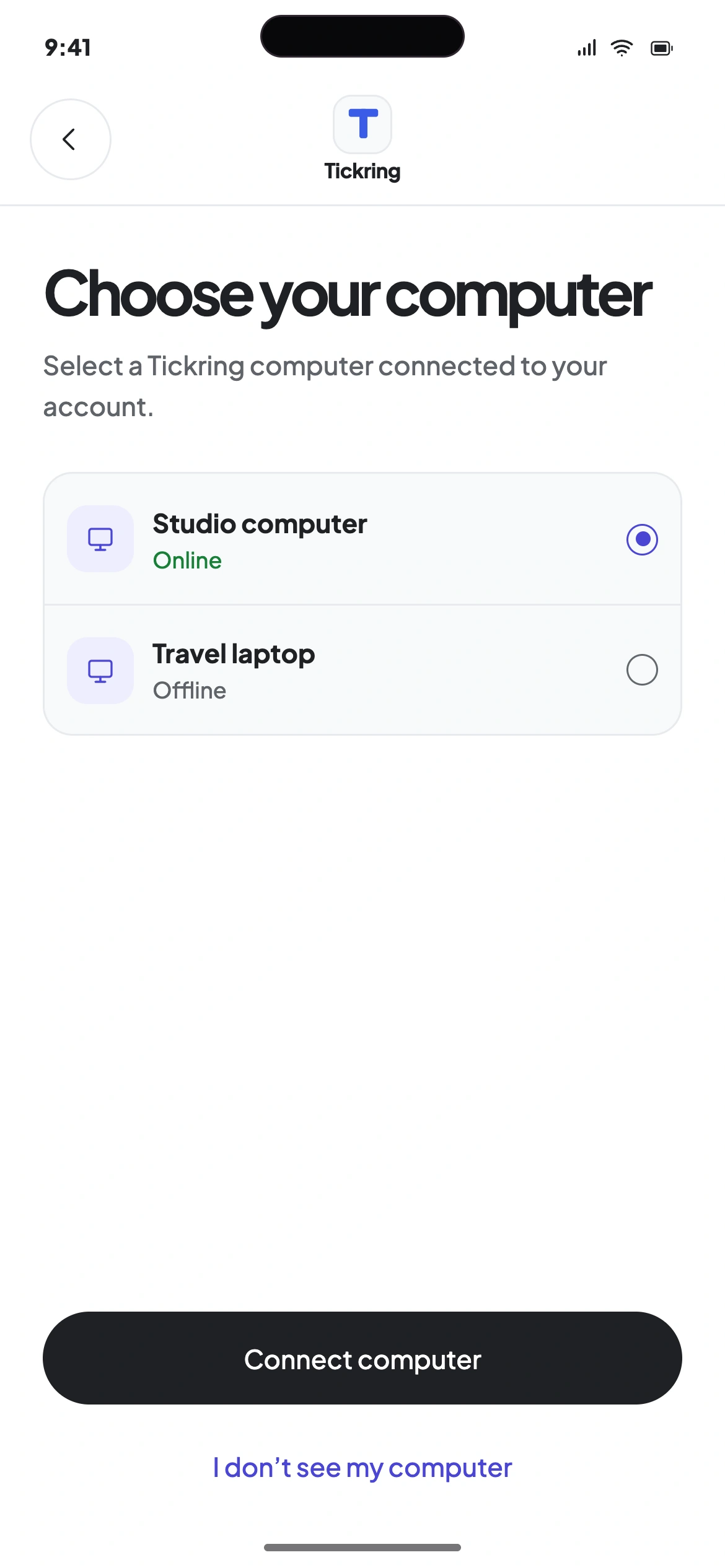
Connect to your Tickring Computer from your phone. Give it a task by message, voice note or call, then follow its progress in the app.

Coming soon for iPhone and Android · App preview

  1. Computer picker showing an online studio computer and an offline travel laptop
    Choose a computer
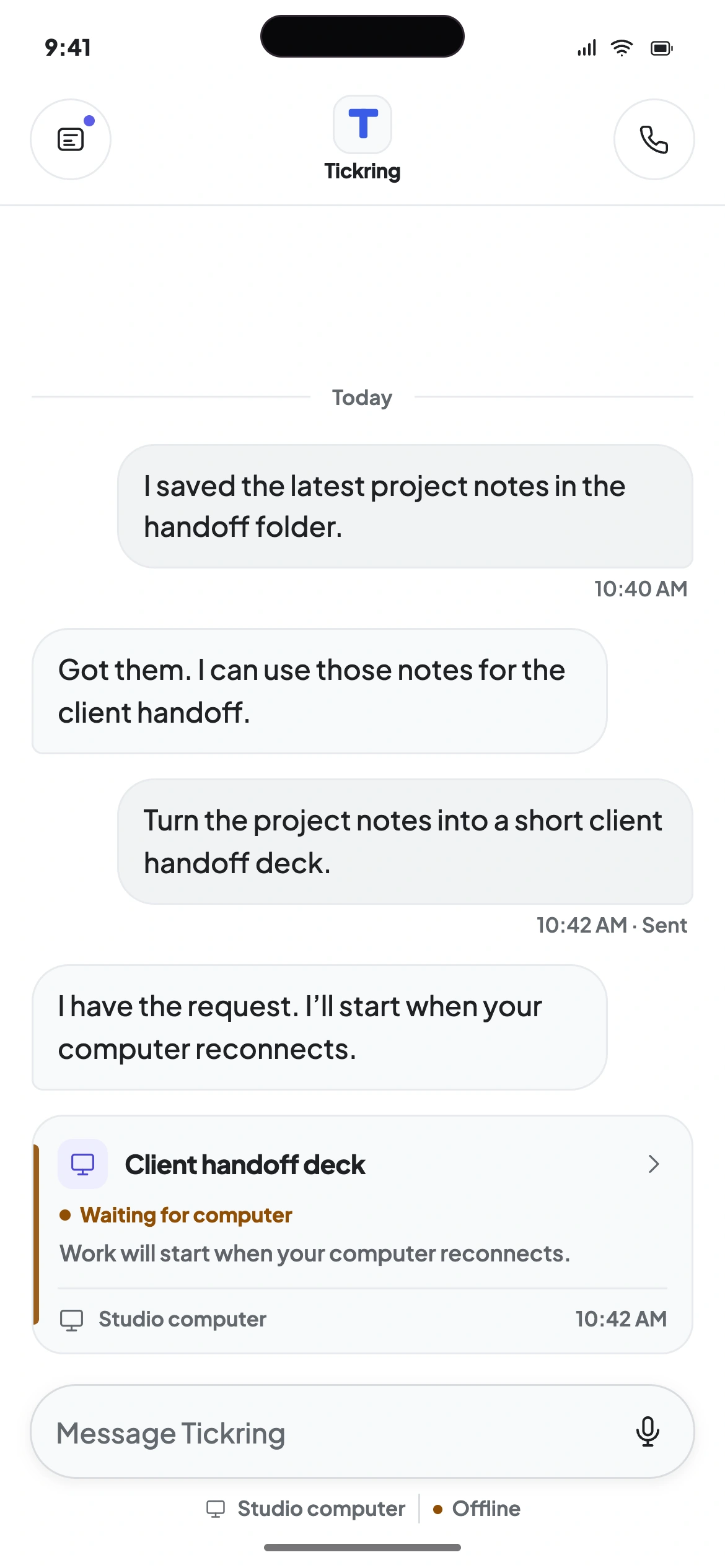
  2. Chat showing a task update and a request waiting for the computer to reconnect
    Computer offline
  3. An active voice call with the studio computer, with mute, speaker and end-call controls
    Live call
  4. Conversation showing the ended call alongside a task in progress
    Call ended
  5. A recorded voice note with a waveform, duration, and options to discard or send it
    Review a voice note

How it works

Your AI computer, with none of the setup.

Choose a plan and join the waitlist. When access opens, connect your AI accounts and APIs. Tickring looks after your Tickring Computer, with setup and maintenance handled for you. No terminal, no remote desktop.

Join the Waitlist

Your own AI computer in three steps.

  1. 1

    Choose a plan.

    Choose Go, Plus, Pro or Ultra. Starting at $39 a month. Join the waitlist now, with no card needed.

  2. 2

    Get an AI computer of your own.

    A private Tickring Computer for your AI apps, with setup and maintenance handled for you. We email you when it is ready.

  3. 3

    Connect the app.

    Once access opens, pair Tickring for Mac or Windows with your Tickring Computer and link your AI accounts and APIs.

Starting at $39 a month.

Every plan is your own Tickring Computer with always-on AI. Pick the one that fits and join the waitlist: no card needed, and we email you as soon as ordering opens.

Ordering opens soon. Join the waitlist, no card needed.

Prices in USD

Start with ChatGPT + Claude

Go

Your own Tickring Computer with ChatGPT and Claude.

$39.17/ month

Monthly price $49$470 billed yearlySave $118

6 CPU cores · 12 GB RAM · 200 GB SSD

Join the waitlist for Go

Core features

Tickring Computer

  • 6 CPU cores, 12 GB RAM
  • 200 GB SSD storage
  • 300 Mbps network speed
  • Unlimited traffic, subject to fair use
  • 2 full snapshots

AI access

  • ChatGPT and Claude with your own AI accounts and APIs

Your own computer

  • Windows, Mac or GPU work uses your own Mac or PC, with your permission
  • Pro and Ultra add on-demand cloud computers with Tickring credits

Includes future AIs

ProRecommended

Every AI as it arrives, with multiple accounts and APIs.

$159.17/ month

Monthly price $199$1,910 billed yearlySave $478

12 CPU cores · 48 GB RAM · 800 GB SSD

Join the waitlist for Pro

Core features

Tickring Computer

  • 12 CPU cores, 48 GB RAM
  • 800 GB SSD storage
  • 800 Mbps network speed
  • Unlimited traffic, subject to fair use
  • 3 full snapshots

AI access

  • All 7 current AIs with your own AI accounts and APIs

Voice

  • Voice, 5× Plus usage

Additional features

  • Future AI additions as they arrive
  • Multiple Accounts and APIs
  • Automatic switching with chat handoverAutomatic account switching is not available for ChatGPT, Claude, and Antigravity. Automatic API switching is supported for ChatGPT, Gemini, and Claude.

Cloud machines

Prepaid
  • Buy Tickring credits for cloud GPU, Mac, Windows and Linux machines
  • Your own Mac or PC with your permission, no credits

Includes Tickring Windows

UltraPower Users

The biggest Tickring Computer, plus Tickring Windows, your private Windows computer.

$239.17/ month

Monthly price $299$2,870 billed yearlySave $718

16 CPU cores · 64 GB RAM · 1000 GB SSD

Join the waitlist for Ultra

Core features

Tickring Computer

  • 16 CPU cores, 64 GB RAM
  • 1000 GB SSD storage
  • 1 Gbps network speed
  • Unlimited traffic, subject to fair use
  • 3 full snapshots

AI access

  • All 7 current AIs with your own AI accounts and APIs

Voice

  • Voice, 20× Plus usage

Additional features

  • Future AI additions as they arrive
  • Multiple Accounts and APIs
  • Automatic switching with chat handoverAutomatic account switching is not available for ChatGPT, Claude, and Antigravity. Automatic API switching is supported for ChatGPT, Gemini, and Claude.

Cloud machines

Included
  • Tickring Windows: your private Windows computer, always on
  • Windows Server 2025 Datacenter · 4 vCPU · 8 GB RAM · 100 GB SSD
  • Buy Tickring credits for cloud GPU and Mac
  • Your own Mac or PC with your permission, no credits

All prices are USD. Pay yearly and save 20%, or pay monthly. Every plan includes your own Tickring Computer and unlimited traffic, subject to fair use. Network speed is 300 Mbps on Go, 600 Mbps on Plus, 800 Mbps on Pro and 1 Gbps on Ultra. Go includes 2 full snapshots; Plus, Pro and Ultra include 3. You can upgrade at any time. Downgrading while preserving your data may require additional time and incur extra fees.

How Tickring credits work

Your Tickring computer

No credits. Tickring does everything it can on your own Tickring computer first. On Ultra, Windows tasks use Tickring Windows, the Windows computer included with your plan.

Your own Mac or PC

No credits. When a task needs Windows, a Mac or a GPU, Tickring can use your connected computer, only with your permission.

Cloud machines

Add prepaid credits at $0.10 each to use on-demand cloud computers when you want, after you approve a quote or within limits you set. Unused reserved credits come back. A cloud Mac has a 24-hour minimum of 300 credits ($30).

Compare all plans

Free, no card

Demo computer

  • Once access opens, sign in to the Tickring desktop app and choose Demo computer.
  • Its ready-made chats, files and actions run on sample data with simulated results.
  • Nothing touches your real computers or work.

Free, with a saved card

Free trial

  • Save a card and get a real, private Tickring Computer for up to 2 hours. Nothing is charged to the card automatically.
  • Want longer? While the trial runs, extend it once by 1–48 hours at $1 an hour.
  • Each account and each card gets one trial. You get reminders with 60 and 15 minutes to go.
  • When the trial ends its data is deleted, so export what you want to keep. Plans are bought separately and come with a new Tickring Computer.

The trial computer has 4 CPU cores, 8 GB RAM and a 160 GB SSD. Trial performance can differ from paid plans. Join the Waitlist

Questions, answered.

Tickring is an AI computer that never switches off. ChatGPT, Claude and your work live together in one app, on a private computer that carries on working after you close your laptop.

Not yet. Create an account, choose a plan and you are on the waitlist. Downloads, the demo and trials open later, and we email you as soon as access opens.

Starting at $39 a month. With monthly billing, Go is $49, Plus $99, Pro $199 and Ultra $299 a month, in USD. Paying yearly costs $470, $950, $1,910 and $2,870 a year, 20% less. Every plan includes your own Tickring Computer and unlimited traffic, subject to fair use. Network speed is 300 Mbps on Go, 600 Mbps on Plus, 800 Mbps on Pro and 1 Gbps on Ultra. Go includes 2 full snapshots; Plus, Pro and Ultra include 3.

See pricing

Yes. You connect your own supported AI accounts and APIs, and your plans, models and history remain yours.

Tickring is built for Mac and Windows; join the waitlist for access. Apps are coming soon to the App Store for iPhone, Google Play for Android and the Mac App Store for Mac. Remote access through the ChatGPT and Claude apps is a separate option.

Where Tickring runs

Tickring Computers are hosted in Tier 3 data centers in the US or EU. Your chats and files stay on your private Tickring Computer, over encrypted connections, using your own AI accounts and APIs.

About security and privacy

Yes. Your private computer carries on while yours sleeps or stays shut, so finished answers and files are waiting when you return.

Read all questions

Where Tickring runs

Coming Soon to iPhone, Android, and Mac

The Tickring desktop app is built for Mac and Windows. Join the waitlist to get access.

  • Apple App StoreTickring for iPhone (iOS)Coming Soon
  • Google Play StoreTickring for AndroidComing Soon
  • Mac App StoreTickring for Mac (macOS)Coming Soon
  • Tickring for MacDesktop appWaitlist open
  • Tickring for WindowsDesktop appWaitlist open
  • Your Tickring ComputerChatGPT and Claude, day and nightWaitlist open
  • Your accountManage it from any browserAvailable now
  • Remote accessThrough the ChatGPT and Claude apps on Mac, Windows, iPhone and AndroidAt launch